Wiring Diagram Editor
Draft professional interconnect diagrams in a cloud-based editor, with preloaded avionics templates, common electrical symbols and smart connections.

Avionics wiring diagram software
SkyWire Studio is a free, cloud-based wiring diagram and interconnect drafting tool purpose-built for avionics installations.

Preloaded templates
01The problem
Avionics shops and homebuilders have long drawn their interconnects by hand in general-purpose tools, spending hours on monotonous detail work for every installation. SkyWire Studio cuts that out with prefabricated symbology and populated LRU templates that are easy to modify, so a drawing that used to take hours takes minutes.
SkyWire Studio changes that.
Faster installations
53%
Speed your installation times by 53% or faster with intuitive drafting tools.
To start
$0
Free to start. No credit card required.
Users on Pro
Unlimited
Scale your team without extra cost
02The platform
Draft professional interconnect diagrams in a cloud-based editor, with preloaded avionics templates, common electrical symbols and smart connections.
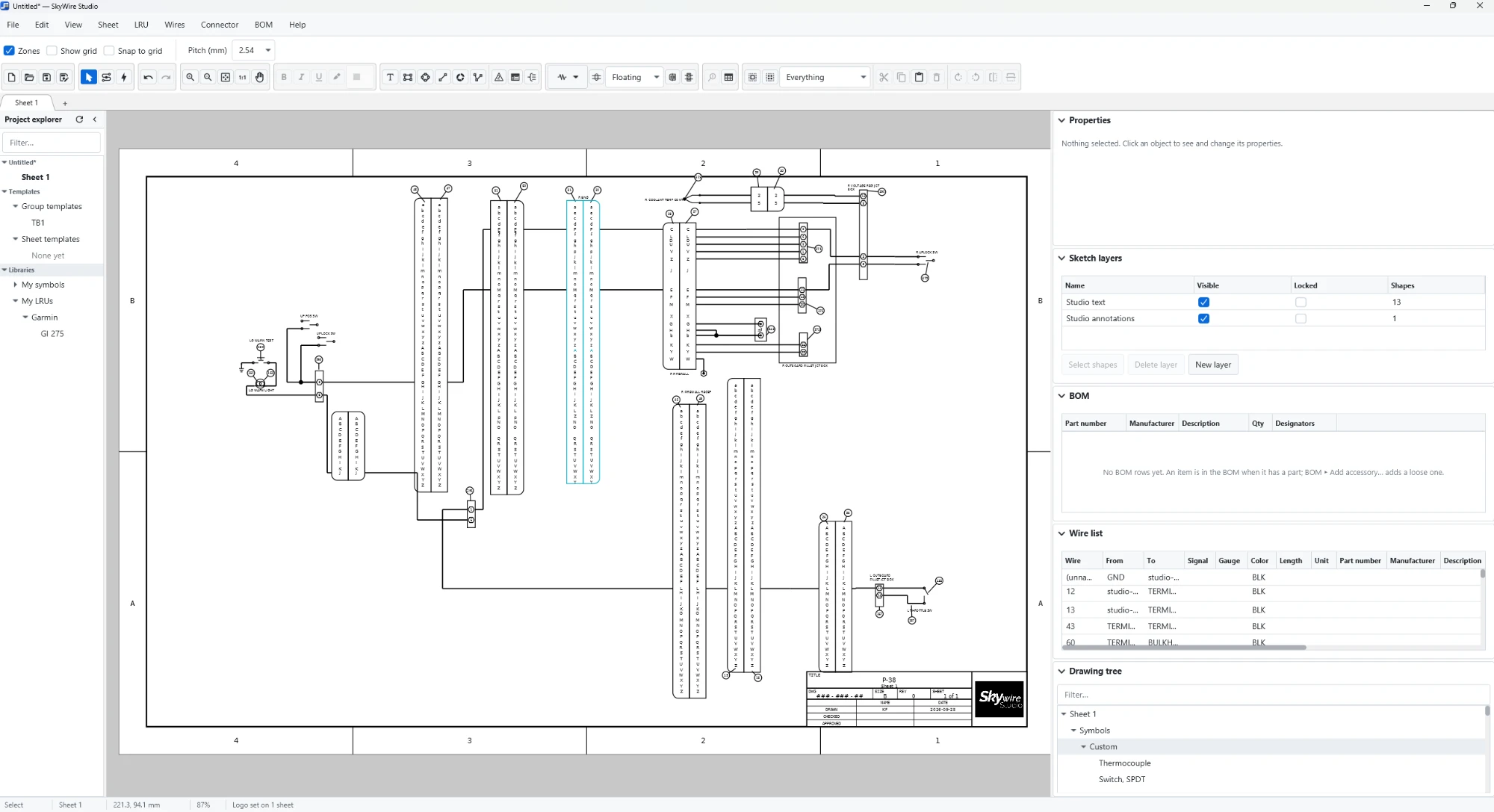
Avionics drawings, built where you work. SkyWire Studio Desktop is Pro on your PC: draw LRUs, connectors, shielded and twisted wires and cables across multiple sheets, then send the wire list and BOM to a spreadsheet and the sheets to PDF. Already drawing on the web? Import those drawings straight in.
Walk from “what’s in my panel today?” to a complete, wiring-ready AXIS equipment plan — new build, retrofit, or G3X Touch upgrade.

Can I keep my GTN 650 with Axis?
Checking the specs on “GTN 650 compatibility”
Yes — your GTN 650 stays. It connects over HSDB and gives you IFR GPS, VHF NAV, and a second COM. Want me to mark it Keep?
Need diagrams drawn for you? Our drafting services deliver precise, professional avionics wiring diagrams for your installation.

03How it works


And everything else you need
Revisions
Easily add revisions and load past revisions.
Multiple sheets
Organize your project into multiple sheets.
Bill of materials
Track parts, quantities, and costs with an integrated bill of materials.
PDF export
Export your diagrams to PDF.
Sharing
Share your projects with other SkyWire Studio users.
Custom logo
Add your company's logo in the title block.
04Plans
| Feature | Pro | Free |
|---|---|---|
| RevisionsEasily add revisions and load past revisions. | Included | Not included |
| TemplatesQuickly add avionics from templates with all pins and connectors populated. | Included | Not included |
| Custom LogoAdd your company's logo in the title block. | Included | Not included |
| SymbolsAccess to an extensive library of electrical symbols. | Included | Included |
| SharingShare your projects with other SkyWire Studio users | Included | Not included |
| SheetsOrganize your project into multiple sheets. | Included | Not included |
| Export to PDFExport your diagrams to PDF. | Included | Included |
| Custom UnitsCreate your own custom LRUs. | Included | Included |
| Image OverlaysAdd your own image overlays, such as images of the connectors. | Included | Not included |
| Community User TemplatesAdd your own templates, or search the community template library. | Included | Not included |
| Sheet TemplatesCreate your own templates based on sheets, and import them in future drawings. | Included | Not included |
| Symbol EditorComing soon! Create your own symbols with the symbol editor. | Included | Not included |
| Bill of MaterialsTrack parts, quantities, and costs with an integrated bill of materials. | Included | Not included |
05In the field
Using SkyWire Studio has been a great addition to our avionics installation and modification workflow. We appreciate its intuitive user interface, the flexibility to create custom LRUs and symbols, and the convenience of its cloud-based platform, which enables seamless collaboration between users. Technical support is outstanding. The founder truly stands behind his product.
SkyWire Studio has been a good way to get drawings done quickly. If you want to keep a crew moving, quick drawings are a must. SkyWire cuts out all the monotonous detail work and gets you going with prefabricated symbology, and LRU population that is easy to modify.
SkyWire Studio has made it easy to organize my avionics wiring into professional diagrams. What used to take hours in Visio, now only takes seconds to minutes.
I spent a good chunk of my engineering career using AutoCAD to make wire schematics and I've enjoyed what you have with SkyWire for avionics focus in mind!
Thinking of switching?
Saved per year
$249
vs Wiring Planner
Users
Unlimited
vs a 5 user limit
Yours
Always
Access your work, even after expiry.